Tuesday, May 5, 2009

Windows 7 RC is now available!

Many of you probably know that the Release Candidate version of Windows 7 is now available. You can easily download it until July 2009, so you have plenty of time. The RC expires on June 1, 2010, however, it will be shutting down bi-hourly (every 2 hours) starting March 1, 2010. You will get an alert 2 weeks before this occurs. Read about the installation here.

Microsoft Windows 7 Home Page

To receive your product key, click here, then scroll down and select the appropriate info. Then log into your Windows Live Account, fill out the application (if you haven't already done so in other places) to get your product key. Or you can just get the list of keys here, since there is only a limited number of keys meaning everyone is basically getting the same keys, just like with the beta in January 2009.

But for those of you that don't want to use an ActiveX Control to download here are some direct download links from Microsoft. These DO support Download Accelerators, so you can perform multi-part downloads. Use these links to download if you do not wish to use the ActiveX Downloader and/or wish to use other browsers (other than IE) and/or Download Accelerators.

Download 32-bit (x86) Windows 7 RC:
English
German
Japanese
Spanish
French

Download 64-bit (x64) Windows 7 RC:
English
German
Japanese
Spanish
French

Note: Occasionally, these links download a useless 110 KB ISO with the same name. If this happens, like it did to me, just try again a few times. The ISO is 2.36 GB so it may take a few hours depending on your network speed.

I am downloading the English x86 version right at this moment. Leave any comments you may have in the comments section!

Sunday, May 3, 2009

Firefox URL Bar: The Unknown Feature

There is a lot of talk about Chrome's new Omnibar, where you can type in anything and it would perform a search on the default search engine, which is Google by default. However, there is one hidden feature in Firefox's Awesome Bar that many have never known even existed. At first, Firefox search from URL bar seems to be like all other browsers, type something thats not a URL, then it searches your default search engine. But thats not how Firefox's one works.

Note: If the follow feature loads up a net error, an add-on may have corrupted your profile. This has occurred for me and I had to reset my whole profile or hunt down the corrupt file. Firefox Safe Mode doesn't fix the issue. This will also not function if you have the Omnibar extension installed.

Yes, if you type in terms, it would search the URL, title or bookmarks and history, etc... but try typing the name of a company in. Unlike other browsers which perform a search for the term, Firefox might do something special and smart.

Try it now! Type in weather into the Awesome bar. Just that, and nothing else. After loading a while, you end up... at Weather.com!

Type in gmail. It will load Gmail right there.

Type in wintechpedia. Since our blog is not as well known yet, it performs a search using your default search engine, just like most browsers would.

Type in WOT. Guess where you end up? To the home page of the Web of Trust!

This doenst' just work with names. Try entering: youtube.com Google. You end up at Google's YouTube Channel!

Firefox does a good job preventing you from visiting malicious sites. If you type in screensavers or screensavers dot com (exactly that), it doesn't go to the first search results because they are all malicious.

This is another awesome feature of the "Awesome bar." I know of no other browser that goes directly to a page. Most other browsers perform just a search. It pretty much finishes the .com, .org., etc... part for you in most cases without you having to press the auto complete shortcut.

Firefox takes your term and does what it thinks is best. If the search result that comes up first is a popular site (i.e. you type the name of a famous company), it would load their page. Otherwise, a search is performed. Pretty neat eh?

Continue reading. New Post on Built in Omnibar! Click here.

Enable Chrome's Omnibar Instead!
But if you don't want this feature above and you want the Omnibar, just install this extension. You might want to go to Manage Search Engines to edit the keywords first cause you'll need them. Then right click on the menu bar and click Customize. Drag the search bar away and voila you're done.

That's all folks for today! Please comment on tech as we need comments to improve on the tech guide. Don't hesitate to ask any questions. Thanks!
By - WinTechpedia™ 2009 Contributors

Friday, May 1, 2009

Surf Safely 3: We are A Community. Helping Everyone Surf Safely.

Welcome to Surf Safely Issue 3, the final issue in our collection of recommendations to stay safe on the web. Personally, this one is my favorite.

We talked about real time link scanning and robot crawling and their benefits as well as flaws. What about community based?


Style: Community Based Rating System

Overview:
WOT, one of the most popular Firefox add-ons, adds tiny color coded icons next to search results to tell you which sites are safe in addition to a toolbar button. There are 5 different colors available: Red, Orange, Yellow, Light Green, Green. The ratings are generated based on user contributions and ratings. This causes a lot of criticism of WOT. However, think again.

Unlike other systems, WOT not only rates Safety, but 4 categories: Overall Trustworthiness, Vendor Reliability, Privacy, and Child Safety.

What makes community based ratings more efficient?
Nobody and nothing is perfect. Just like SiteAdvisor and SafeWeb, its not perfect. Obviously, there may be some incorrect ratings here or there. So if you can't be sure, why use something that everyone can change and anyone can mess up the ratings. The answer is ... thats not true. The system is far more complicated than just: Unrated site, random user rates it down, the site becomes red. That is not how it works.

WOT users have something called an activity score. As you rate and comment on sites, your score goes up and as your score goes up, the less score you receive per rating and comment. Anyway, as people agree with your comments, your user personal trust increases. You cannot view your user trust as it is all automated. Higher score users typically have a higher trust than lower score since most higher score users have been users for a while. If you have a high reputation, it is not likely you will mess up ratings, so your ratings can have a large impact on the site's overall rating. On the other hand, if you have a low score, reputation, and is a new user, your ratings won't contribute much to the rating.

There are many manipulation prevention methods, which most people that criticize WOT about community ratings don't realize.

Now why is community based efficient? Imagine the following situation (which is actaully a true situation): A site starts off safe. Both WOT and robot crawlers rate the site Green for safe. A few days or weeks later, the server is hacked and it starts redirecting to sites hosting malicious software instead. WOT users who find out re-rates the site, tells others to check the site, and re-rate it to, therefore changing the rating. How long other systems take to change the rating is anyone's guess.


Performance:
As I mentioned in earlier issues, I use 3 site advisors: WOT, Norton SafeWeb, and AVG Linkscanner. WOT is the fastest loading of them all. Also, it is the only one that also functions on a dynamic version of Google, which has an extra piece of URL and coding. It loads with the page and doesn't slow it down at all.

Features:
4 Rating Categories so you can even use it as parental controls. By default, a warning screen shows upon visiting any dangerous RED and DARK RED site. You can easily change it to warn up to Yellow. In addition, you don't just have to warn, you can BLOCK it too. The blocking feature prevents browser exploits by loading the ratings BEFORE the page loads and blocking access before the page even gets a chance to load. This causes a slight sub-second browsing delay for obvious reasons. So you decide: Extra Security at the cost of slight page loading time or regular page load time but no malicious page blocking?

Warning Screen:


Blocked Screen (notice the URL):


The WOT Design team also created a Colorblind version.


Disagree with a rating and don't want to see the warnings? Rate the site yourself and voila! You're done. The warnings will stop appearing for you. If you want to request to change the site's rating completely, contact the WOT Support Team by clicking here. Their email response time is really snappy aka very fast (on weekdays).

How accurate compared to others?
In order to properly compare, you need to look at the overall trend, not just one particular site. In reality, WOT has the least inaccurate ratings overall and has the most frequently updated ratings as well as the most sites rated. New rogue sites are rated within one day of their appearance which is when many trusted sources such as Sunbelt Blog posts information about them. Many users know of these trusted sources, and then rate all the fraud sites.

As with previous issues in this series, we will test the rating on two known sites serving malicious software and files.

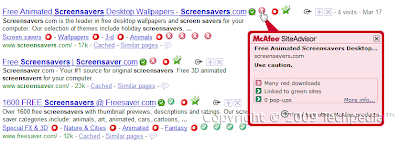
screensavers.com: RED


warez.com: ORANGE

The number of people icons on this mouse over popup indicates the confidence of the rating. The more people rate a site a certain color, the more confident the rating is.

Additional Notes:
A slightly modified URL of Google Searches cause all other site advisor add-ons to not function. However, people have reported this and the WOT Developers at Against Intuition have allowed this to work. So no matter which version you use, WOT will still protect you even if others don't!

Ratings on this blog have been provided by WOT. Mousing over any link gives you a button that when clicked will open the site's scorecard for the sub-domain (or domain). All sub-domains have their own sub-domain. All Twitter Profiles also have one too!

Visit our WOT Scorecard here!

Free Internet Security - WOT Web of Trust
Join the community, start spreading your knowledge with the world, and help everyone stay safe on the web!

Wednesday, April 29, 2009

Permanently Block Dangerous Sites


Hello everyone! It's me - Creastery™ 2009, posting here again.
Today, I am going to teach you how to block sites that you do not want to visit.
Example, advertisements and also sites that have auto pop-ups.
This is available for Windows and Mac operating systems.

For Windows:

Windows XP = C:\WINDOWS\SYSTEM32\DRIVERS\ETC
Windows 2K = C:\WINNT\SYSTEM32\DRIVERS\ETC
Windows 98\ME = C:\WINDOWS

Whichever applicable, open the file "hosts" with any editor. Eg: Notepad.
* Add the following on its own line in the hosts file, using the sites that apply to you:

You will see something like this below:

# Copyright (c) 1993-1999 Microsoft Corp.
#
# This is a sample HOSTS file used by Microsoft TCP/IP for Windows.
#
# This file contains the mappings of IP addresses to host names. Each
# entry should be kept on an individual line. The IP address should
# be placed in the first column followed by the corresponding host name.
# The IP address and the host name should be separated by at least one
# space.
#
# Additionally, comments (such as these) may be inserted on individual
# lines or following the machine name denoted by a '#' symbol.
#
# For example:
#
# 102.54.94.97 rhino.acme.com # source server
# 38.25.63.10 x.acme.com # x client host

127.0.0.1 localhost
~~~~~~~~~~~~~~~~~~~~~~~~~~~~~~~~~~~~~~~~~~~~~~~~~~~~~~~~~~~~~~~~~~~~
At the localhost, you can add on like this.

127.0.0.1 localhost facebook.com youtube.com blogger.com
~~~~~~~~~~~~~~~~~~~~~~~~~~~~~~~~~~~~~~~~~~~~~~~~~~~~~~~~~~~~~~~~~~~~
Remember to leave a space between each website. After you are done, save and quit.

For Mac Operating System,
In Finder, from the Go menu, choose "Go to folder." then type "/etc/".
At the /etc/ folder window, open the "hosts" file in a text editor.
Add the following to the hosts file in its own line, using the site that applies to you:
127.0.0.1 metafilter.com flickr.com facebook.com blogger.com
That is just an example.

After you are done, save and quit.
~~~~~~~~~~~~~~~~~~~~~~~~~~~~~~~~~~~~~~~~~~~~~~~~~~~~~~~~~~~~~~~~~~~

By right, if you use any of those servers above available,
you should get a "Server Not Found" error. This will be effective if you put virus websites, spam sites like www.funbox.com, all these will be blocked.

That's all folks for today! Please comment on tech as we need comments to improve on the tech guide. Don't hesitate to ask any questions. Thanks!
By - WinTechpedia™ 2009 Contributors

Sunday, April 26, 2009

Surf Safely 2: Database Created by Web Crawlers

Welcome to Issue 2 of the introduction to safe search site advisors. Stop guessing which search results and sites are safe!

Note: This post is about McAfee SiteAdvisor, however SafeWeb was included even though its not free because they are very similar.

McAfee SiteAdvisor:
A similar program is McAfee SiteAdvisor. Similar to Norton SafeWeb, except this one does not require the security suite.
Internet Explorer (Windows only)
Mozilla Firefox (Windows, Mac, and Linux)*
Price: Free

Download SiteAdvisor for Firefox here.
The download at the SiteAdvisor site is an .exe file, therefore installing for IE and Firefox on Windows.
*There are reports that SiteAdvisor does not function on non-Windows. I have only tested the add-on on Windows. Leave a comment if you have used (or tried) on Mac or Linux/Unix.

Norton SafeWeb:
For Microsoft Windows
Internet Explorer and Mozilla Firefox
Component in Norton Internet Security 2009 and Norton 360 v3.0.
Price: Varies depending on suite. See Symantec site for details.
***Comes bundled with Norton 360 3.0 and Norton Internet Security 16.5 Patch. No longer as a standalone add-in download (as was for previous NIS 2009 versions/patches)***

Style: Robot Crawler Scanning Database

Both programs function the same way. They put tiny color coded icons next to search results with 3 distinct colors: Red, Yellow, and Green. They load from their own database and clicking the icons loads the scorecard, where you can view various information.

Norton only has ratings for the main domain. SiteAdvisor too, except for .blogspot.com and various other sites.
Both services provide ratings for all .blogspot.com sub-domains although most probably aren't rated at all. Norton also gives ratings for freewebs.com/*.

SafeWeb is integrated with Norton Toolbar, which is part of your security suite so it technically doesn't load with Firefox. SiteAdvisor loads with Firefox as a regular add-on if you install the .xpi and not the .exe.

Once you finish installing SiteAdvisor as the .xpi, it prompts you to install the .exe, just close it.

SiteAdvisor uses a status-bar label (which on Firefox causes the whole statusbar to become higher), while Norton uses a new toolbar. SiteAdvisor comes with a "Secure Search" bar using Yahoo! Search. Similarly, Norton Toolbar (as of NIS v16.5 patch) also has a "Secure Search" bar using Ask Search. The Norton Verified Ask Search removes all dangerous search results. This Ask Search is NOT the same one as regular searches on Ask Search. The SiteAdvisor search bar, doesn't give any benefits because Yahoo! already uses SiteAdvisor security information. I never use either search engine and luckily, you can easily disable the bar on both. Both are not third-party toolbars.

Performance:
Comparing it to WOT and Linkscanner, Norton was slower than both, and SiteAdvisor was the slowest of them all, also slowing down overall browsing and conflicting with search add-ons (placing ratings over others sometimes). Norton Toolbar didn't slow down browsing much. Tested on Firefox 3.0.10.

Active Shield:
The Internet Explorer version of SiteAdvisor gives a tiny alert bubble when visiting a suspicious or malicious site. The same thing is for SafeWeb, however, it warns on both browsers. Norton basically just automatically shows what you would see if you click on the safety icon. Norton, however, gives a full blocked warning screen for valid phishing sites, as that is the purpose of Norton Toolbar. SiteAdvisor gives absolutely no warning on Firefox, just the red statusbar label. When visiting a blacklisted phishing site, SiteAdvisor redirects you away.

Accuracy:
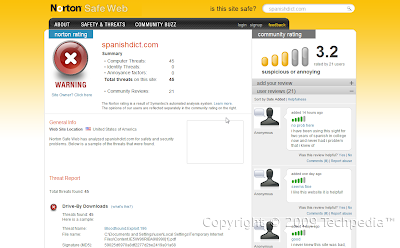
Both retrieve ratings by an automated bot scanning pages to a database. The problem with this is that if a server was infected for a few minutes and that is just when the bot scans it, the site will be hurt. The rating will not likely change for a long time, such as this one. All the bad community ratings didn't actaully say anything. They were being influenced by the Norton rating. See below.

Update:
Norton has re-scanned the site and it is back on green.
I am not responsible if you visit these known malicious sites and download malicious files.
Time for the known malicious site test.

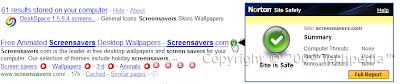
screensavers.com:
SiteAdvisor: RED

Norton: GREEN

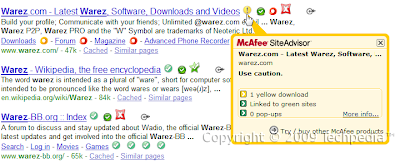
warez.com
SiteAdvisor: YELLOW

Norton: GREEN
And false positives?
If ANY mailicious software is found on a site, Norton will not give it a green. So far, no green site has any scanned malware. SiteAdvisor still gives green if only a small percentage is mailicious.

As of 4/29/09, Norton rates Softpedia YELLOW for one malicious file. Rating may change as site gets re-scanned.
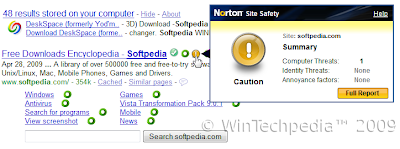
Norton also tends to flag Google Cache servers as malicious since the safety depends on the cached site itself.

Robot crawlers tend to be slow at rescanning pages and have many obsolete ratings, especially SiteAdvisor. In addition, remember that SiteAdvisor does NOT block or even warn (on Firefox version) about malicious sites. Theres just a red label in the status bar. Norton just popups open the little dialog to warn. However, on blacklisted phishing sites (which is quite uncommon), the label turns black and redirects to a SiteAdvisor warning page rather than loading the site itself.

Although Norton SafeWeb is quite inaccurate right now, its fairly new (public beta in July 2008). So far, I have noticed that Norton re-scans pages a lot (as in A LOT faster) faster than McAfee. I have noticed some inaccurate ratings on Norton update within 2 weeks (such as the spanishdict.com above). SiteAdvisor doesn't seem to be nearly as fast. But remember: SafeWeb is NOT free.

I recommend having all 3 types of advisors for optimal security: Community Based, Web Crawler, and Real Time Scanner. I use WOT, Norton SafeWeb, and Linkscanner. I used to use McAfee SiteAdvisor, however, from personal experience, it slowed down browsing, has a lot of obsolete ratings, and commonly didn't show up on Google searches. I no longer use SiteAdvisor, but its a good alternative to SafeWeb for those who don't use Norton suites. The ratings on this blog have been generated by WOT.

Visit our SiteAdvisor rating details!
Visit our Norton SafeWeb rating details!

That's all folks for today! Please comment on tech as we need comments to improve on the tech guide. Don't hesitate to ask any questions. Thanks!
By - WinTechpedia™ 2009 Contributors