Showing posts with label Gmail. Show all posts

Tuesday, July 7, 2009

Google Apps Drops the Beta Label

Do you use Google Apps products like Gmail, Google Calendar, and/or Google Docs? You may have noticed it always had that Beta label on it. Today, they finally drop the Beta making it a “final” product though it probably makes no difference. Gmail has been in “beta” for over 5 years.

How does this change make you feel? More confident using Google Apps?

To me, it doesn’t really make a difference. If you want that label back to “soothe the soul” there’s a new Gmail Labs feature that adds the Beta label back to the logo.

Leave your thoughts about this in the comments.

More information can be found at:

Official Gmail Blog
Lifehacker
New York Times

Wednesday, June 3, 2009

Comparison of Official Chat Clients.

Most of us use Multi Protocol clients these days, but its good to know how each protocol service’s official client is. So… that’s what we are doing today. We will be comparing the features of AIM, ICQ, Yahoo!, Windows Live, Google Talk client, and Google Talk Gmail version. The following apply to the client’s Microsoft Windows version. Features may or may not vary for other platforms. We are NOT promoting any of this software in any way in this post.

Notes on Classification/License: Adware is not necessarily dangerous. A program is listed as Adware if they: Attempt to install software (like toolbars) that is not required for program’s functions, installs search engines, changes your default search engine, and/or displays advertisements. Homepage change may also be included.

We are only displaying the unique features and special features of the client under Pros to save space because many clients have the exact same features. Notice that most of them are adware.

I am not affiliated with the developers of these clients.

AIM (AOL Instant Messenger) v6.9: (not recommended)
Requires AOL or ICQ Screenname
Classification: Adware and Spyware

Pros:

  • Social Networking Status Updates
  • Real Time IM. See what your buddy is typing.
  • AIM Plugins to extend your experience
  • Customize buddy list with colors
  • Tabbed IMs. Regroup and detach.
  • Search for buddies by typing their email address.
  • AIM Expressions so you can have different IM backgrounds. This is actually a protocol feature but only the client supports it
  • Emoticon fireworks
  • Connect with ICQ (same protocol)

Cons:

  • No Log Viewer. Must view in external HTML viewer
  • Heavy advertising with mouseover popup ads
  • AIM Zone Pop Up upon start up by default. Covered with flashy ads.
  • Force installs Viewpoint Media Player with NO option to opt out. See below for details.

Why This Program is Classified as Adware/Spyware:

  • Attempts to install AIM Toolbar with AIM Search, QQGames, and AIMTunes by default, all of which is not required for AIM to function. Even if you choose to not install these, the .exe is already downloaded with the main setup and placed into your installation directories.
  • Attempts to change your homepage to aim.com
  • Attempts to make AIM Search default.
  • Displays banner and text advertisements within the program (very heavy with some mouseover popup like ads). Also known to randomly download huge trailers for ads.
  • Force installs potentially unwanted software with no option to opt out. See below for details.

WARNING! AIM and other AOL Software installs a program called Viewpoint Media Player without user consent. Viewpoint Media Player is Adware and potentially Spyware. They claim it is required to view so-called media like SuperBuddy Icons. They give no option to opt out. If you uninstall it, it will secretly reinstall itself if you have administrative rights the next time you launch AIM or the AOL product. Even the AOL browser does this. Thats not all. Viewpoint has a unique user ID and will eventually track how users interact with the media. Thats still not all.

ICQ v6.5:
Requires AOL or ICQ Screenname
Classification: Adware

Pros:

  • ICQ Plugins (Xtras).
  • Connect with AIM (same protocol)
  • Tabbed IMs
  • Chat Log Viewer
  • Skins to customize experience
  • Quick reply. Reply from the new IM notification.

Cons:

  • ICQ Zones (like AIM Zones) pop ups on startup by default. Covered with flashy ads.
  • Heavy advertising both on buddy list and IM window

Why This Program is Classified as Adware:

  • Attempts to install ICQ Toolbar with ICQ Search.
  • Attempts to make icq.com the homepage
  • Attempts to make ICQ Search default.
  • Displays banner and text advertisements within the program

Yahoo! Messenger v9.0:
Requires Yahoo! Account
Classification: Adware

Pros:

  • IMVironments: Interactive IM backgrounds
  • Yahoo! Plugins to extend your experience
  • Skins to customize your experience
  • Custom Ringtones
  • Sound effects and soundtracks during Voice and Video Chat
  • Audibles: Send animated talking characters to your buddies
  • Yahoo! Games built in without any additional software
  • Buzz Feature
  • Stealth: Be invisible to only certain buddies
  • Connect with Windows Live Messenger (MSN), Microsoft Office Communications Server, Lotus Sametime, and Reuters Messaging users
  • Chat Log Viewer

Cons:

  • Tabbed IMs not available in Windows version
  • Some banner and text ads within program.

Why This Program is Classified as Adware:

  • The default “Typical Install” tab hides these options. By default, Yahoo! Toolbar will be installed.
  • Attempts to make Yahoo! Search default by default.
  • Attempts to change homepage to yahoo.com by default.
  • Displays banner and text ads within program

Windows Live Messenger 2009 (v14):
Requires Windows Live ID
Classification: Adware

Pros:

  • Colorful and attractive themes (scenes) and colors
  • Smooth integration with Windows
  • Lots of backgrounds for individual IM windows
  • Buzz Feature
  • Connect with Yahoo! buddies
  • Play games with your buddy right from the window without additional software.
  • Drag and drop pictures to your buddies
  • See Whats New in your buddies networks
  • Groups: Group Chat with an entry in your buddy list
  • Built in Log Viewer

Cons:

  • Some banner and text ads within program.
  • Today pops up by default at startup

Why This Program is Classified as Adware:

  • Banner advertisements.
  • Text advertisements.
  • By default MSN home page and Live search default and keep default set after Windows Live Installer runs.

Google Talk v1.0: Requires Google Account (Gmail required for logging)
Classification: Freeware

Pros:

  • Simplicity.
  • Skinnable IM windows.
  • Scrolling IM windows. Works like tabs.
  • Voice chat
  • No advertisements. 100% Ad Free.

Cons:

  • Highly feature lacking. Too many to list.
  • Last Official Update: January 2007 (v1.0.104)

We are adding the Gmail Google Talk version because that is the main version developed by Google Inc. and is one of the most popular ways people access Google Talk (Jabber/XMPP).

Google Talk Gmail Version Requires Google Account with Gmail capability
Classification: Website

Pros:

  • Simplicity.
  • Watch YouTube right from the IM “window”
  • Video and Voice Chat with plugin
  • Group Chat
  • Many Emoticons in 4 styles
  • Connect with AIM Buddies using your AIM Screenname
  • No ads on any chat interface.

Cons:

  • No IM colors.
  • No advanced client features

Comparison Chart Key:

  1. 1. Group Chat
  2. 2. Themes and Skins
  3. 3. Video Chat
  4. 4. Voice Chat
  5. 5. Multi-Protocol Support
  6. 6. Add-ons and Plugins
  7. 7. Banner Graphical Ads
  8. 8. Text Ads
  9. 9. Play games with buddy
  10. 10. Buzz
  11. 11. Chat Logs
  12. 12. Built in Chat Log Viewer
  13. 13. Hides Extra Software*
  14. 14. Number of Additional Offers**
  15. 15. Installation Size***
  16. 16. My rating of the product. Ratings are relative to this category of products and are not eligible to compare to ratings on official multi protocol clients. Rating scale: 0.5 (Very Poor) to 5.0 (Superior). Note: Gmail Gtalk is Webware, not client therefore it has been rated in relation to typical web browser versions.

AIM ICQ Yahoo! WLM Gtalk Client Gtalk Gmail

Adware Adware Adware Adware Freeware Website
1 Yes Yes Yes Yes No Yes
2 Colors only No Yes Yes No Yes
3 Yes Yes Yes Yes No Yes ****
4 Yes Yes Yes Yes Yes Yes ****
5 No
(1)
No
(1)
Yes
(4)
Yes
(2)
No
(1)
Yes
(2)*****
6 Yes Yes Yes No No No
7 Yes Yes Yes Yes No No
8 Yes Yes Yes Yes No None on chat interface
9 Requires QQGames No Yes Yes No No
10 No No Yes Yes No No
11 Yes Yes Yes Yes Yes (w/ Gmail account) Yes
12 No Yes Yes Yes No Yes
13 Yes Yes Yes No No N/A
14 6 (1 are forced) 3 3 2 1 N/A
15 25 MB 51 MB 27 MB 43 MB 4 MB N/A
16 1.3 2.9 4.0 4.5 3.5 4.7
*Hiding extra software means that the program’s installation hides extra software like toolbars under “Recommended”
**Extra offers refers to toolbars, search engines, and homepage changes that are offered. AIM’s force install of third party software is included here.
***As installed on Windows XP Professional SP3
****Requires Video and Voice Plugin
*****Requires AOL/AIM Screenname.
My Personal Opinion:
If you are new to IM and only want one service with an official client, try Windows Live Messenger or Google Talk Gmail Version. Otherwise, consider using full multi protocol clients.
I personally do not recommend the official AIM Client.

Which client would you choose?
Happy chatting!

Post Updated 6/5: I updated this post today because I realized that WildTangent was previously installed with AIM 5.5. It is no longer installed in AIM 6 in favor of QQGames for the gaming service.

Friday, May 15, 2009

Which Email Web Service Do You Choose?

Email is part of our everyday life. We use it to communicate. We use it to access other online services. We use it to retrieve information. Many companies are developing free web based email services and many of us have tried many of them but have chosen one and left the rest of them gathering dust. So, lets make a comparison of the top 4 email service giants: Gmail (Google Mail), Yahoo! Mail, Windows Live Hotmail, and AOL/AIM Mail. We will compare the features, both pros and cons, as well as the effectiveness of their spam filter. The following applies to the standard versions and do not apply to those designed for educators and businesses such as Google Apps.

Like browsers, there is also an email war going on. When Gmail was released on April 1, 2004, many thought it was an April Fools Joke as 1 GB of free storage was amazing back then. Following Gmail’s steps and to keep up with competition, other emails quickly moved their storage up and upgraded to an Ajax interface. Slowly rising to the top and most popular service is Gmail also known as Google Mail.

I am not affiliated with any company mentioned here.

Gmail (Google Mail)
Price: Free
Google Inc.

Pros:

  • Simplicity. Just like all Google products. Faster loading
  • Special Feature: Messages are grouped like conversations. Got a huge chain? They’re all combined into one conversation like archive rather than a bunch of individual emails
  • All Ajax powered. No reloading of the whole page.
  • A collection of nice themes to choose from as well as an option to make your own.
  • Free POP/IMAP
  • Auto forward mail to ANY email address(es).
  • Send mail as other email addresses including other Gmail, Yahoo!, AOL, Hotmail, anything.
  • Download messages from other services and accounts via POP*
  • Gmail Labs. Test out Gmail/Google’s latest ideas.
  • Google Talk/XMPP Chat and AOL Instant Messenger (AIM) Integrated. Most advanced and developed version of non-third party Google Talk Clients w/ Voice and Video Chat now available too. Chat logs save in the Chats folder and work just like a normal email.
  • Labels, not folders. Same as folders except each message can have more than one.
  • Unobtrusive contextually related text ads. No, Google does NOT read your mail.
  • Web clips. Read RSS Feeds from sites you select. Comes with some sponsored links however.
  • Unlimited Custom Filters
  • Advanced Attachment Features if you have Flash Player installed. Progress Bar so you can see how much is uploaded.
  • Ever growing storage. Storage meter can be viewed from the Gmail/Google Mail Login Page.
  • 20 MB Attachment Limit
  • Security Boost: No .exe, .bat, or .msi (executables) allowed although .jar (Java Executable) files are allowed
  • Option to always use HTTPS encryption
  • Advanced Email Search Tools
  • Account Activity. Know if your account is open on another session or computer. Button to sign off all other locations and sessions
  • A lot of colorful and modern looking animated emoticons and smiles to put in email and chat
  • No graphical ads. No ads in email!
  • Archive! Want to keep a message but not in your inbox? Archive it! Its still in your account and can be viewed through “All Mail”
  • Free Custom Domain through Google Apps
  • Preview some attachment files in browser including .jpg, .png, .doc, .pdf, .ppt, and more.
  • Message snippet so you can know a part of the message before opening it.
  • July 1, 2009 NEW! Drag and drop messages to labels

Cons:

  • Does not have a right click context menu where you can set message options
  • Heavy reliance on Javascript occasionally causes browser CPU usage to go slightly high sometimes.
  • No preview pane even if you wanted it. However, reading pane has a few security issues.

*Except Yahoo! Mail. Yahoo! Mail requires a Plus account subscription to be able to download messages via POP. See Yahoo! Mail below.

Yahoo! Mail
Prices: Free with Yahoo! Plus-$19.99/year USD
Yahoo! Inc.

Pros:

  • Tabbed interface
  • Yahoo! Chat and Windows Live Messenger integrated with the tabs
  • Drag and drop into folders
  • Unlimited Storage
  • Nice stationary to add a background and theme to emails
  • Special right click context menu
  • SMS Text Message integrated with chat
  • 10 MB Attachment Size is free version
  • Receive mail from other accounts*

Cons:

  • Maximum of 100 (previously 15) filters in free version. Yahoo! Mail Plus gives you 200 (previously 50)
  • In order to receive 20 MB attachment size like Gmail, you need to pay for Plus. 10 MB Limit in Free.
  • No Free POP/IMAP. Yes, that means no Outlook, Thunderbird, iPhone, or any other email client. Send and receive mail from other accounts requires Plus, which also has a restriction of 10 addresses only. Requires Yahoo! Mail Plus.
  • No Forward Mail to other accounts, even other Yahoo!. Must pay for Plus
  • No easy way to view all flagged messages
  • Overloaded and stuffed with ads. All of which take significantly longer to load than the actual mail. Graphical banner ads. Text ads. That’s not all. Ads in the actual outgoing email too. Many of which go to unsafe sites.
  • Doesn’t go directly to Inbox. Goes to a welcome page where news, weather, and more ads are shown.
  • The button to hide the banner sidebar ad is barely useful as when you click on a message, the ads come back.
  • Not as customizable as other emails. Only choose from 7 colors.
  • Yahoo! sends many many ads to you including Yahoo! Shopping by default
  • No HTTPS/SSL Encryption in Mail available
  • Heavy reliance on Javascript occasionally causes browser CPU usage to go slightly high sometimes only.
  • Using your own custom domain costs an additional $35/year USD
  • Custom from: addresses for Plus only.
  • Most features available only to Plus members are available in other services free of charge.

*Except Yahoo! Mail. Yahoo! Mail requires a Plus account subscription to be able to download messages via POP.

Windows Live Hotmail
Price: Free with Hotmail Plus-$19.95/year USD
Microsoft Corporation

Pros:

  • Many colorful themes to choose from.
  • Choose where to have the preview pane with the option to turn it off.
  • Ever growing storage starting at 5 GB as long as it increases reasonably (Plus: 10 GB)
  • Special Right Click Context Menu
  • Drag and drop emails into folders
  • Link Windows Live ID accounts so you can quickly switch and use one name to sign onto all.
  • Free POP3
  • Windows Live Messenger Web Version integrated. Sign into chat from Mail
  • Custom from: Address (Send as other accounts)
  • Receive mail from other accounts*
  • A Welcome page with news like Yahoo! however can be skipped to go directly to Inbox by changing options
  • 10 MB Attachment Limit
  • Free Custom Domain through Windows Live Custom Domains
  • Unlimited Filters

*Except Yahoo! Mail. Yahoo! Mail requires a Plus account subscription to be able to download messages via POP. See Yahoo! Mail section.

Cons:

  • No Auto Forwarding to other email services. Restricted to Windows Live. To forward to Gmail, simply use Gmail’s POP feature.
  • Graphical Banner Ads. Ads in the email message on outgoing mail. Take longer to load than actual mail
  • No HTTPS/SSL Encryption
  • No IMAP Access
  • No Star/Flag Emails
  • 20 MB Attachment Limit like Gmail requires Hotmail Plus

AOL/AIM Mail
Price: Free – Special Boost for paying AOL Subscribers
AOL Corporation

Pros:

  • Lots of colorful themes to choose from
  • AIM Integrated
  • “You Got Mail” voice
  • Unlimited Filters
  • Unlimited Storage
  • 16 MB Attachment Limit
  • Customizable sidebar panel with plugins and gadgets
  • Right Click Context Menu
  • Drag and drop emails into folders
  • Copy emails and contacts from other emails powered by Trueswitch
  • Free POP3/IMAP
  • Free Custom Domain through AOL My eAddress

Cons:

  • Text ads. Graphical banner ads. Ads in all outgoing email signatures. AOL Subscribers can remove these outgoing email ads. Ads take longer to load than the actual mail
  • No automatic forwarding.
  • No custom from addresses (send mail as another account)
  • No HTTPS/SSL Encryption
  • Can’t receive mail from other accounts, only copy

Spam Filter Testing

To carry out this test, I created a test email account on each and gave the email away to a site that I have tested to send many spammy emails. Within minutes, spam started rolling in. Here are the results of each. These INCLUDE ads and offers sent by the company themselves. The exact same sites were given each of my 4 test emails. Obviously, these include offers sent by the companies themselves. These emails were not used to sign up for any service therefore, any emails other than the default welcome emails received here are spam. I review the emails to make sure they aren't alerts from the company, which so far, they never are.

Last Updated: June 16, 2009

Services delete spam mail after some time however this should not affect the results as new mail should always be filtered as much as possible.

Gmail:
Received: 82
Spam Filtered: 75
Filtered: 91%

Yahoo!:
Received: 369
Spam Filtered: 155
Filtered: 42%

Windows Live:
Received: 53
Spam Filtered: 15
Filtered: 28%

AOL:
Received: 531
Spam Filtered: 25
Filtered: 5%

From the above results, you can see that Gmail scored far higher than all others. Yahoo! received quite a lot of spam and AOL simply received an overload of it. Keep in mind that I entered the 4 emails into the exact same sites. Many of the unfiltered messages in AOL and Yahoo! were clearly spam.

Now my past experiences with existing accounts: Gmail received no spam at all. Google never sends any email except for the default welcome emails, of course, unless you choose to receive email from other services. Windows Live and AOL rarely received anything either, although AOL might send one every so often. Yahoo! however, sent a lot by default, including ads and offers, such as Yahoo! Shopping and to unsubscribe, you need to manually do so.

Feature Comparison Chart

Last but not least, is our comparison chart for the email services on their respective free version. Red is negative. Orange is partial/okay. Green is positive.


Gmail Yahoo! AOL Hotmail
Integrated Chat Yes Yes Yes Yes
POP Access Yes No** Yes Yes
IMAP Access Yes No** Yes Yes
Custom Domain Name Yes No***** Yes Yes
Unlimited Storage No (Ever growing) Yes Yes Partial***
Grouped and Threaded Emails Yes No No No
Themes Yes Colors only Yes Yes
Drag and Drop Email Yes Yes Yes Yes
Option to Turn off Preview Pane No Pane No Yes Yes
Message Snippet Yes No No No
HTTPS Encryption Yes No No No
Auto Forward Yes No** No Partial****
Text Ads Yes Yes Yes No
Graphical Ads No Yes Yes Yes
Email Tagline Ads No Yes Yes Yes
Custom from: Addresses Yes No**+ No Yes
Receive Mail from other accounts* Yes Yes No Yes
Custom Filters Unlimited 100 Unlimited Unlimited

*Except Yahoo! Mail. Requires Yahoo! Mail Plus to use POP3.
**Feature only available in Yahoo! Mail Plus. $19.99 USD per year.
***Ever growing storage as you need it. Will receive warning if increase unreasonably.
****Only to other Windows Live/MSN/Hotmail/Microsoft accounts
*****Costs an additional $35 USD Yearly
+Requires Yahoo! Mail Plus and restricted up to 10 addresses only.

Which webmail service do you use? Make your voice heard by voting. Leave any comments you may have in the comments section of this post.

Thursday, April 16, 2009

Completely Modify How Sites work

Greasemonkey... what is it? Its an add-on that does absolutely nothing at first. But if you know Javascript or grab some scripts from sites like Userscripts.org, it can do pretty much everything. Here are some must-have scripts for popular sites. Note that many scripts are simply slightly modified duplicates of others.

Remember this is Firefox only. For all platforms.

This is in no way a complete list of the best scripts. It is simply a list of excellent scripts you should try if you use any of the following sites. To change settings for certain scripts, go to the site that its enabled on, then right click on the status icon, and there should be an option over UserScript Commands.

Note: I did not create any of the following scripts. Copyright by their respective developers.

YouTube

1. YousableTube Fix
YouTube is a very popular media site that most people visit just about every single day. The most requested feature is to download videos. Many many (if not hundreds) of scrips add download links to videos and this one is no exception. But its not called YouTube Download. Thats because it does much more than just let you download in FLV, FLV HQ, MP4 .H264, and MP4 .H264 HD. It adds resize buttons, complete list of format changers, and more.

2. YouTube Ultimate HD
Again, this adds more download links. Thats okay. It has 3 options for download: FLV, 3gp, and MP4. It also can optionally auto highest quality, change video player color, turn off autoplay, and more. Configuration requires editing the script in text editors though. It does not have a configuration window. You need to manage user scripts and edit it from a text editor. Changing of color uses Hex Color codes.

3. YouTube Old Player HD
Why would we want the old player? Well, the new one doens't DO much. Combined with Script 2 above, you can make a high quality using an old player. Why is the old player better? It has features like: Restart, Shrink to not fit (actaul size), and the great Warp feature. Because the first script listed here was optimized for the new player, the resize feature will not work properly with this script.

If you want to remove the widescreen too, consider this script: YouTube Old Player HD
If you want a lights out button on all videos, consider this script: YouTube Lights Out

Heres what is all looks like: (I did not remove widescreen) This is NOT my video. I'm just using it as an example. Copyright © 2009 MasteroftheXP.
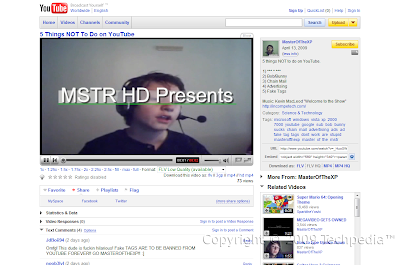
Whats the Warp feature? Its a feature available under TestTube right now, but its always been here. Basically, when you mouse over a video, a circle of related ones appear, as shown below

Facebook (SSL Here)
To revert back to the old Facebook, see my guide here.

1. Facebook Fixer
This is an all in one Facebook script with an easy configuration. There are too many to list so here are some features. Top and bottom toolbar transparency, top bar stay with page, Picture/Image/Photo Large Thumbnail Preview, Zodiac signs, linkify all IM usernames (not just AIM), remove highlights, pokes, connect with friends, friends you may know, and much much more. Fully customizable.

2. Facebook Purity
Hide and one button show annoying application and quiz messages from your news feed. If you want to take it to the extreme, take script number 3.

3. Un**** Facebook
This hides everything the developer finds annoying. This includes: Quiz messages from news feed (not chain letters though), excessive profile links, and more. Not configurable, unfortunately. It also adds your status back to the home page, just like it was before the March 2009 update. Both Facebook Fixer and this script can remove the rounded thumbnail pictures too. This also moves the filter list to the left and if you disabled that list, it occasionally overwrites other scripts at this. Be aware that this WILL mostly hide profile boxes. This takes Facebook Purity to the extreme.

4. Facebook Auto Refresh
The new real time stream is nice. But notice it doesn't auto refresh. So, this script automatically refreshes the home page every 300 seconds, or 5 minutes. The timer is located at the top.

Heres what you will get:
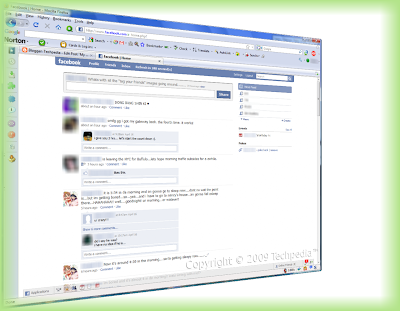
Gmail/Google Mail
Google's email is coded using the Ajax format allowing loading without reloading the whole page. Other emails started using Ajax after Gmail. Here are some scripts to make Gmail even awesomer than it already is.

Most of these scripts are part of Lifehacker's Better Gmail 2 Add-on.

1. Highlight Row
Highlight color when you mouse over any message. Yellow for read. Green for unread.

2. Favicon Unread Count
The favicon has the unread messages number so you can easily see how many messages you have from other tabs.

3. Attachment Icons
Instead of just a paper clip, the icon shows what type of attachement. It theres more than one attachment and they're different types, the paper clip remains.
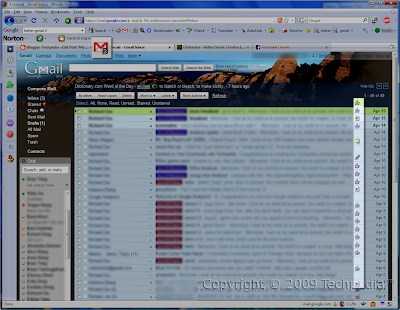
Google Search
Choose ONE of the following. Don't use them both together. There are some conflicts.

1. Google Fx (Recommended)
An alternative to GoogleMonkeyR is Google Fx. This script does A LOT. It also transfers data from their own server each time too. There are too many to list so you can probably figure out from this screenshot. This script activates on almost every Google site, which may cause problems on some so add certain sub-domains to the Exclude list, such as http*://mail.google.com/*. Script mainly for Google Search and Google Images. Fully customizable.
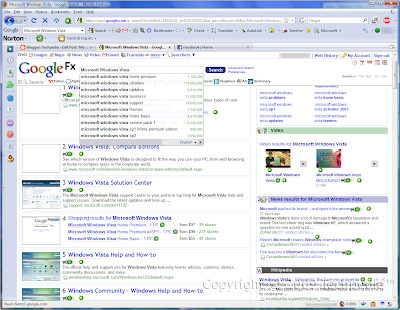
2. GoogleMonkeyR
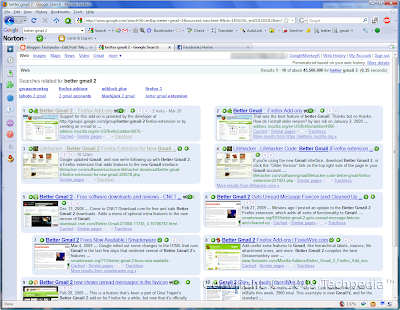
This single script does a lot to help your Google Searches. It doesn't do as much as Google Fx but it still does a lot. Choose up to 4 columns, highlight results, hide nav bar if you use Google Toolbar, favicons on results, Google Preview images, and more. Also remove Google tracking (direct link rather than a 10-mile long URL redirect) either automatically or manually through a "Trackless" button. Fully configurable. Heres what you get.
Remember, these scripts are for Firefox only. Some scripts may work with Opera and/or Google Chrome, however they work to its fullest in Mozilla Firefox. Get Firefox with
Greasemonkey today!

That's all folks for today! Please comment on tech as we need comments to improve on the tech guide. Don't hesitate to ask any questions. Thanks!
By - Freedomstar & Creastery™ 2009