Internet Explorer 8 introduces a nice new feature known as Accelerators where you can highlight any word and a blue button appears. Clicking that button lets you search that highlighted term using a variety of engines right there. Firefox doesn't have this feature built in, but like most other features, it can be replicated. There are many ways to do this.
For the second time, I am posting about ways to get accelerators for Firefox. The first one was about Kallout, which adds a nice button like IE and lets you search from a pre-selected number of engines. Now, want full Accelerator support?
Basically it makes an extra option in the right click context so you can search using your installed engines, then head on over to the IE Addons site. Notice that the Add to Internet Explorer buttons on the accelerators now say Add to Firefox. This was made possible by a script.
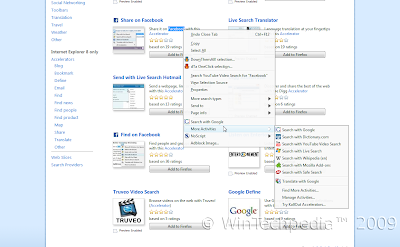
However, there is one drawback to this. Unlike Kallout, this doens't use the button. Instead, it uses a right click menu. A bit more inconvenient, but works with most IE Accelerators. In addition, the button that appears on IE and on Kallout is slightly obstrusive and can lag, especially Kallout on some Blogger blogs, including ours.
Recommendation from the developers of IE Activities: Upon installing, you will get a notice saying that they recommend installing Kallout. They work nicely together but I found using both unnecessary. I currently use IE Activities because I find the overlay button that automatically appears slightly obtrusive.
That's all folks for today! Please comment on tech as we need comments to improve on the tech guide. Don't hesitate to ask any questions. Thanks!
By - WinTechpedia™ 2009 Contributors
For the second time, I am posting about ways to get accelerators for Firefox. The first one was about Kallout, which adds a nice button like IE and lets you search from a pre-selected number of engines. Now, want full Accelerator support?
Basically it makes an extra option in the right click context so you can search using your installed engines, then head on over to the IE Addons site. Notice that the Add to Internet Explorer buttons on the accelerators now say Add to Firefox. This was made possible by a script.

However, there is one drawback to this. Unlike Kallout, this doens't use the button. Instead, it uses a right click menu. A bit more inconvenient, but works with most IE Accelerators. In addition, the button that appears on IE and on Kallout is slightly obstrusive and can lag, especially Kallout on some Blogger blogs, including ours.
Recommendation from the developers of IE Activities: Upon installing, you will get a notice saying that they recommend installing Kallout. They work nicely together but I found using both unnecessary. I currently use IE Activities because I find the overlay button that automatically appears slightly obtrusive.
That's all folks for today! Please comment on tech as we need comments to improve on the tech guide. Don't hesitate to ask any questions. Thanks!
By - WinTechpedia™ 2009 Contributors


